

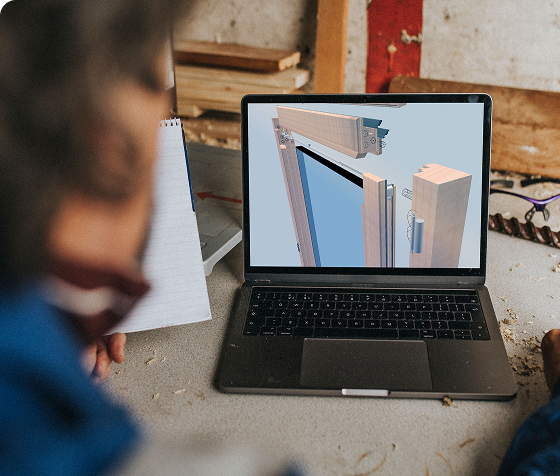
Se lavori nella produzione di componenti in legno, pietra, vetro o materiali compositi, ti sarà sicuramente capitato di imbatterti nelle sigle CAD e CAM. Sono acronimi che ricorrono di continuo e che, spesso, vengono usati insieme, come se fossero sinonimi.
La differenza principale è che il CAD viene utilizzato per progettare il pezzo, mentre il CAM trasforma il progetto in percorsi utensile e istruzioni operative per la macchina CNC. Il CAD definisce quindi cosa produrre; il CAM stabilisce come produrlo.
Si tratta quindi di due fasi distinte ma complementari del processo produttivo. Comprenderne le differenze aiuta a scegliere gli strumenti più adatti più adatti e a creare un flusso continuo dalla progettazione alle lavorazioni in macchina.
Cosa fa un software CAD?
CAD è l’acronimo di Computer-Aided Design, ovvero progettazione assistita dal computer.
All’atto pratico, però, cosa fa un software CAD? Si tratta di un software che permette ad architetti, ingegneri e designer di creare disegni tecnici, modelli 2D e geometrie 3D di un prodotto prima della sua effettiva messa in produzione.
Evoluzione digitale del tradizionale disegno manuale, il CAD consente di lavorare con maggiore precisione, automatizzare operazioni ripetitive e creare librerie personalizzate di modelli e componenti.
Grazie al CAD è possibile definire forma, dimensioni, tolleranze e caratteristiche del prodotto prima di passare alla produzione.
Cosa fa un software CAM?
CAM sta per Computer-Aided Manufacturing. Mentre la fase di progettazione si avvale di strumenti CAD per la gestione del progetto, il CAM entra in gioco per programmare le lavorazioni necessarie a produrre il componente su una macchina CNC.
Il modello creato in fase di design viene importato all’interno del CAM e viene “tradotto” in istruzioni operative per i centri di lavoro.
L’operatore o il programmatore CAM seleziona gli utensili, le strategie di lavorazione e parametri come velocità, avanzamenti e profondità di passata.
Sulla base delle strategie e dei parametri impostati dall’operatore, il CAM calcola e ottimizza i percorsi utensile, verificando i movimenti necessari per eseguire la lavorazione.
Infine, il post-processore converte i percorsi utensile in un programma NC compatibile con il controllo numerico e con la configurazione della macchina.
CAD vs CAM: le principali differenze
La distinzione tra i due sistemi è, principalmente, funzionale. Infatti, il CAD si occupa di creare un modello digitale che il CAM utilizzerà per programmare e gestire l’esecuzione delle lavorazioni che daranno vita al prodotto.
In altre parole, il primo genera la geometria del pezzo, definendo nel dettaglio forma, dimensioni e specifiche tecniche, mentre il secondo stabilisce come realizzare concretamente il progetto, impartendo istruzioni al centro di lavoro per guidare la traiettoria e i parametri di taglio degli utensili.
CAD e CAM sono due fasi complementari del processo produttivo digitale: è la loro continuità a determinare la qualità del risultato finale. Ed è proprio quando si riesce a passare dal design alle istruzioni di lavorazione senza interruzioni o conversioni manuali chesi riducono sensibilmente gli errori di interpretazione e i passaggi manuali tra Ufficio Tecnico e Produzione.
Un ambiente integrato in cui la progettazione dialoga con la produzione in modo nativo rappresenta un vantaggio competitivo perché garantisce coerenza tra ciò che viene disegnato e ciò che viene realizzato.
Di seguito, trovi una tabella riepilogativa delle principali funzioni e differenze tra CAD e CAM.
| CAD | CAM | |
|---|---|---|
| Significato | Computer-Aided Design | Computer-Aided Manufacturing |
| Funzione | Progettare un prodotto o componente | Programmare le lavorazioni in fase di produzione |
| Input | Requisiti e dati di progetto | Modello o geometria CAD |
| Output | Disegno o modello digitale | Percorsi utensile e programma NC |
| Utilizzatore | Progettista o Ufficio Tecnico | Programmatore CAM od operatore CNC |
| Collegamento con la macchina CNC | Generalmente indiretto | Diretto tramite post-processore |
| Obiettivo | Definire cosa produrre | Definire come produrlo |
| Fase del processo | Progettazione | Programmazione produzione |
Vuoi avere una panoramica completa sul funzionamento di un software CAD/CAM e sulla sua integrazione con le macchine CNC?
Quando serve un sistema CAD/CAM integrato
In realtà, CAD e CAM non sono opzioni alternative, ma funzioni che lavorano in sequenza all’interno di uno stesso processo. La scelta, quindi, dovrebbe basarsi sul tipo di processo che la tua azienda gestisce e fino a che punto arriva la catena produttiva.
Quando serve il CAD?
Chi ha l’esigenza di disegnare, documentare e validare un progetto può lavorare con un sistema CAD. È il caso di studi tecnici, progettisti e uffici R&D che producono modelli, tavole quotate e specifiche destinate poi ad altri reparti o fornitori. Qui il valore sta nella qualità e nella precisione del modello digitale.
Quando serve il CAM?
Chi, invece, deve portare quel progetto in lavorazione su una macchina a controllo numerico ha bisogno anche del CAM. Senza questa fase, il modello resta un disegno: utile, ma non ancora produttivo.
Quando conviene utilizzare un sistema CAD/CAM integrato?
Nella maggior parte dei contesti industriali, la soluzione più completa ed efficace è un sistema integrato CAD/CAM. Unendo progettazione ed esecuzione in un unico ambiente, si riducono i passaggi tra ambienti separati e le conversioni manuali dei dati. Il risultato è un flusso continuo dal disegno alla macchina, con dati sempre coerenti, tempi di setup ridotti e una maggiore coerenza dei dati lungo l’intero processo produttivo.
There is no single choice that is valid for everyone: there is the one that is right for your production. Before you decide between CAD, CAM, or an integrated solution, check which requirements are truly the top priority for your company.
Practical Applications Across Different Industries
Un sistema CAD/CAM integrato mette in comunicazione progettazione e produzione, consentendo di trasformare il modello digitale in lavorazioni eseguibili dalla macchina CNC. Questo collegamento è particolarmente importante nei settori in cui precisione, qualità del risultato e coerenza tra progetto e prodotto finito sono determinanti.
Lavorazione del legno
Il CAD viene utilizzato per definire geometrie e dimensioni di complementi d’arredo, serramenti, scale o elementi strutturali. Successivamente, il CAM trasforma il progetto in operazioni di taglio, foratura, fresatura e sagomatura, generando percorsi utensile adatti per il centro di lavoro CNC che lavorerà il pannello di legno.
Lavorazione della pietra
Per la realizzazione di piani cucina, lavabi, rivestimenti o elementi sagomati in pietra, la funzione del CAD diventa quella di disegnare profili, aperture e dettagli del pezzo. Il CAM, invece, si occupa del taglio, della contornatura, della foratura, della svuotatura e finitura del pezzo, tenendo conto delle caratteristiche del materiale lavorato e della macchina utilizzata.
Lavorazione del vetro
Per la lavorazione di una lastra di vetro, il CAD permette di definire forma, dimensioni, fori e aperture. Il CAM genera le lavorazioni e i percorsi necessari per eseguire taglio, molatura, foratura e altre operazioni, in funzione degli utensili disponibili e della configurazione del centro di lavoro.
Lavorazione dei materiali compositi
Nel caso di componenti in fibra di carbonio, vetroresina o altri materiali compositi, il CAD viene utilizzato per creare geometrie anche complesse. Il CAM consente di programmare lavorazioni a più assi, definendo strategie, utensili e parametri adeguati per ottenere precisione e qualità senza danneggiare il materiale.
DDX sviluppa soluzioni CAD/CAM dedicate alla lavorazione di legno, pietra, vetro e materiali compositi. Ogni software tiene conto delle caratteristiche del materiale, delle strategie di lavorazione e della configurazione della macchina CNC.
Ogni settore presenta però esigenze specifiche: parametri, utensili e strategie cambiano passando dalla lavorazione di un pannello in legno a quella di una lastra di granito o di vetro, fino a una struttura in materiale composito. Per questo è importante utilizzare un software CAD/CAM progettato per gestire le caratteristiche del proprio comparto produttivo. Per questo la vera differenza la fa un software CAD/CAM pensato per il proprio comparto produttivo, capace di gestire le particolarità di ciascuna lavorazione senza compromessi.
Scopri tutte le soluzioni CAD/CAM DDX dedicate alla lavorazione del legno, della pietra, del vetro e dei materiali compositi.